Make microsoft edge's UI more responsive and faster. This trick works with other gui apps too....
Most modern pcs have two graphics cards installed, one is intel hd graphics, and another is an AMD or nVIDIA, which is dedicated gpu.
Whenever you use your pc normally for low graphics intensive things like web browsing, reading documents etc, intel hd graphics is used which saves power but has low performance.
But when you do some graphics intensive things like gaming etc, your pc uses dedicated gpu i.e. AMD or nVIDIA one, which consumes more power but shows higher performance.
So guys who have 2 graphics cards on their pcs and they don't care about higher power consumption, they can force their pc to use dedicated gpu which running any app(like microsoft edge), this would make the app's UI faster.
Here are the steps-
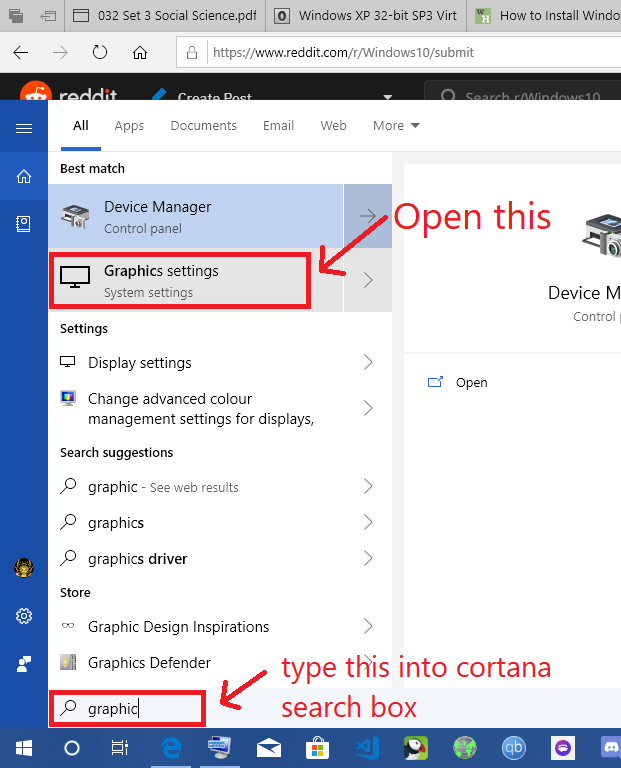
1. Open cortana, type "Graphics settings" in the search box and then open the graphics settings.
​
[SCREENshot](https://preview.redd.it/lbspv9wym6f21.png?width=621&format=png&auto=webp&s=6344123e0067e35900724a6d79401014be5f82fa)
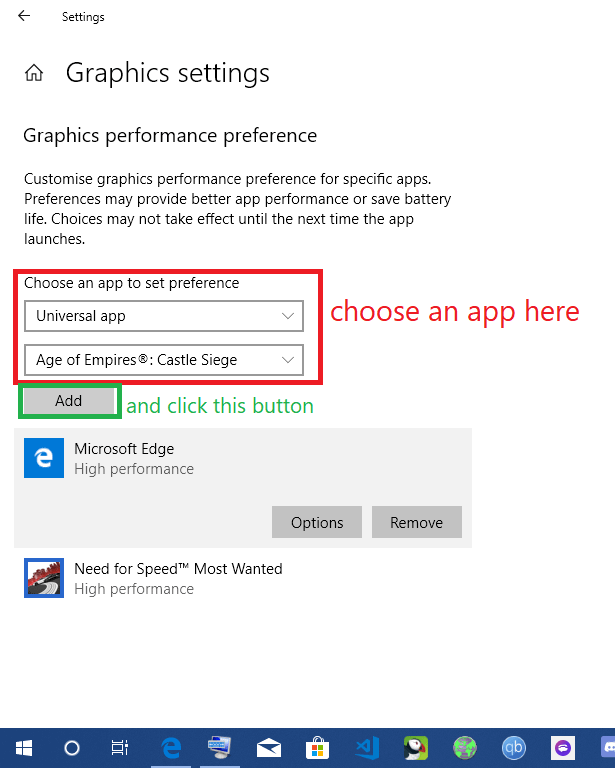
2. Then, in the graphic settings, under the text, "Choose an app to set preference", there would be drop down menu and then choose your desired app and click "ADD" button.
​
[another screenshot](https://preview.redd.it/bzze2ql8o6f21.png?width=615&format=png&auto=webp&s=0c378354d2964fea2158a577a39c0aa5db504fc5)
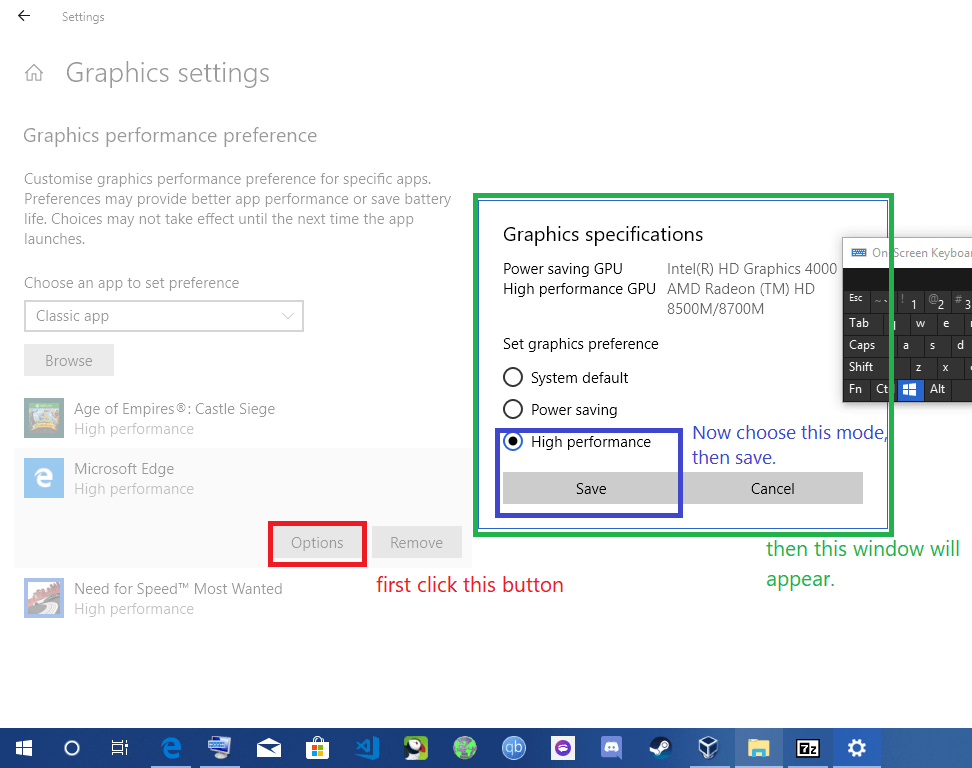
3. Now click on your "added" app, and click options button, then choose high performance mode and then save it.
​
[last screenshot](https://preview.redd.it/cibyk9c5p6f21.png?width=972&format=png&auto=webp&s=9c878a2b4de517bbd3b5fe2e1e992185f3f7870a)
Now enjoy.
Whenever you use your pc normally for low graphics intensive things like web browsing, reading documents etc, intel hd graphics is used which saves power but has low performance.
But when you do some graphics intensive things like gaming etc, your pc uses dedicated gpu i.e. AMD or nVIDIA one, which consumes more power but shows higher performance.
So guys who have 2 graphics cards on their pcs and they don't care about higher power consumption, they can force their pc to use dedicated gpu which running any app(like microsoft edge), this would make the app's UI faster.
Here are the steps-
1. Open cortana, type "Graphics settings" in the search box and then open the graphics settings.
​
[SCREENshot](https://preview.redd.it/lbspv9wym6f21.png?width=621&format=png&auto=webp&s=6344123e0067e35900724a6d79401014be5f82fa)
2. Then, in the graphic settings, under the text, "Choose an app to set preference", there would be drop down menu and then choose your desired app and click "ADD" button.
​
[another screenshot](https://preview.redd.it/bzze2ql8o6f21.png?width=615&format=png&auto=webp&s=0c378354d2964fea2158a577a39c0aa5db504fc5)
3. Now click on your "added" app, and click options button, then choose high performance mode and then save it.
​
[last screenshot](https://preview.redd.it/cibyk9c5p6f21.png?width=972&format=png&auto=webp&s=9c878a2b4de517bbd3b5fe2e1e992185f3f7870a)
Now enjoy.